An engagement rate is easy to calculate and easy to misread. A creator can get two very different percentages from the same posts simply by changing the number underneath the fraction. Before you put a rate in a media kit or use it to judge a new format, decide what question the number should answer.
This guide uses a simple, repeatable calculation for your own Instagram posts. It counts likes, comments, saves, and shares as actions. It is an editorial worksheet, not an official Instagram score or a prediction of sales.
01
Choose the audience number that fits your question
By followers asks how many actions a typical post earned relative to your follower count. It is useful when comparing your own posts over a short period or preparing a clearly labelled media-kit figure. Followers are not the number of people who saw any one post.
By reach asks how many actions occurred relative to the accounts reached by a typical post. It is useful when distribution changes: a Reel may reach well beyond your followers while a smaller post may reach fewer people. Use average post reach with average post actions; an account-wide reach total covers a different set of posts and cannot be dropped into this formula.
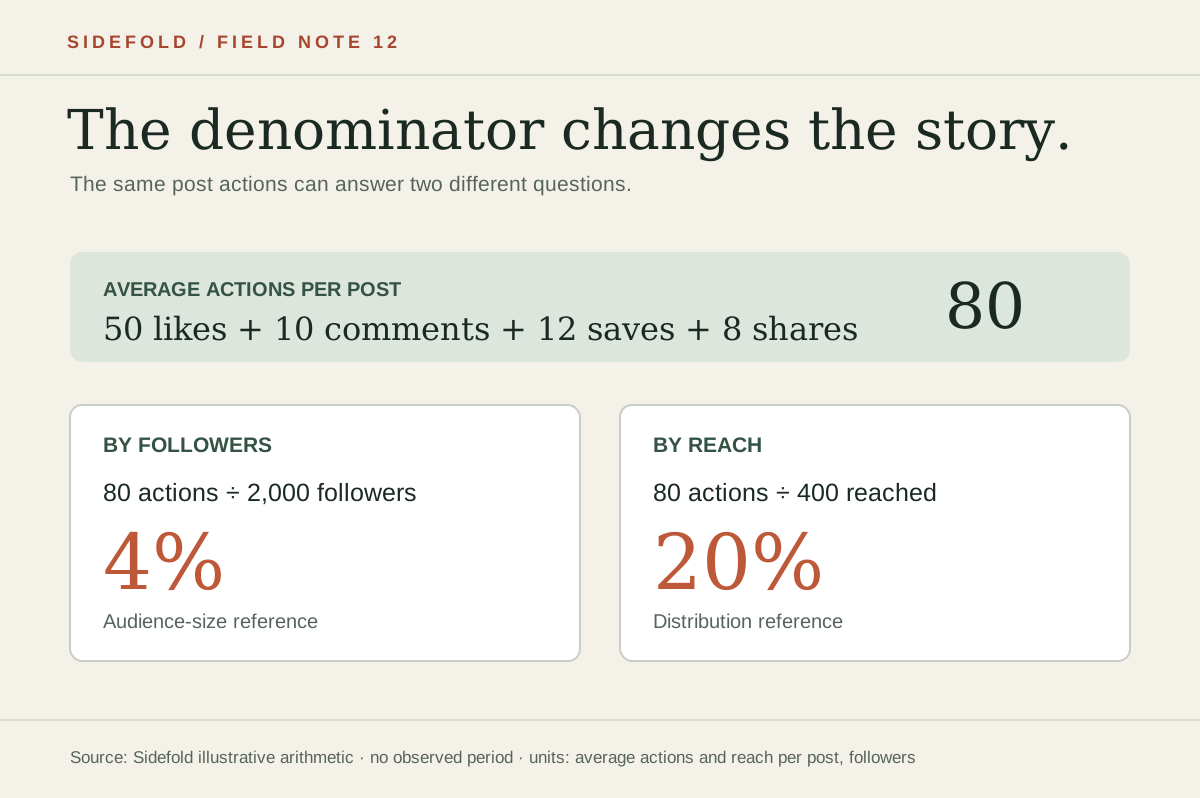
The illustration above holds the actions fixed at 80 per post. Dividing by 2,000 followers gives 4%; dividing by 400 accounts reached per post gives 20%. Neither percentage is “the” engagement rate without its method.
02
Collect a small set of comparable posts
- Pick a defined period and one format, such as your last ten organic carousels. Keep Reels, Stories, paid posts, and static photos in separate groups if their distribution differs substantially.
- For each post, record likes, comments, saves, and shares. If your Instagram account shows post insights, record that post’s reach too. Instagram’s account and content Insights guidance explains where current insight views are available; use the labels and definitions shown on your own account.
- Add each action column, then divide each total by the number of posts. Do the same for reach if you are calculating by reach. Record your follower count on the date you prepare the summary.
Do not use a blank or hidden share count as zero. If a metric is unavailable, say which actions your rate includes and keep that definition consistent. A newly published post has had less time to accumulate actions, so avoid comparing it with older posts as though observation time were equal.
03
Calculate, and write the method next to the result
Add your four per-post averages, divide by the chosen denominator, and multiply by 100. Sidefold’s free Instagram engagement-rate calculator shows the arithmetic and lets you switch between followers and reach. It uses numbers you enter; it does not inspect your Instagram account.
Average actions: 50 likes + 10 comments + 12 saves + 8 shares = 80 actions per post.
By followers: 80 ÷ 2,000 × 100 = 4%.
By reach: 80 ÷ 400 × 100 = 20%.
A useful report line is: “Average engagement by reach: 20% across ten organic carousels, measured [dates]; actions include likes, comments, saves, and shares.” Replace the example values and dates with your own. If you share a follower-based number, say “by followers” instead.
04
Read what the rate says—and what it cannot say
This calculation counts actions, not unique people. Someone can both like and save a post. That is why a reach-based actions rate can exceed 100%. A percentage alone also cannot tell you whether someone read a guide, clicked a product link, joined a list, or bought anything.
Look at the component actions alongside the rate. Saves might suggest a checklist was useful later; shares might suggest a post helped someone explain an idea to a friend. Those are hypotheses, not facts about why people acted. To understand a publishing goal, inspect the next step too: the destination page, link clicks you can verify, and replies that reveal unanswered questions. Our sustainable posting guide shows how to review a few weeks of posts without chasing a universal benchmark.
Comparisons need the same formula, included actions, content format, period, and observation window. An outside “average engagement rate” may use a different denominator or include a different set of interactions. State your method before comparing.
05
Use the numbers to plan one better post
Choose one post that earned a meaningful action for the reader. If an outfit breakdown was saved often, make the next one easier to revisit: name each piece, add fit notes, and keep product destinations current. If a guide received questions in comments, answer one question in the next post. Change one thing, then compare it with posts of the same format after a similar amount of time.
When a post points to an affiliate item, engagement is only part of the journey. Make the recommendation and disclosure clear, then test the destination. The Instagram affiliate-link guide covers that handoff. If the reader needs a single stable destination, use a shoppable post and describe what they will find there.
06
Common questions
What is the Instagram engagement-rate formula?
For the method in this guide, add average likes, comments, saves, and shares per post. Divide by follower count or average reach per post, then multiply by 100. Label which denominator you used.
Should I calculate by followers or reach?
Use followers when you need a stable audience-size reference; use reach when you want to know how many actions occurred relative to the accounts reached by comparable posts. The two percentages answer different questions and should not be compared as though they were the same metric.
Can engagement rate be more than 100%?
A rate based on actions can exceed 100% because one account may take more than one action, such as liking and saving a post. It is not the percentage of unique people who engaged.
Calculate one clearly labelled rate.
Use comparable posts, name the denominator, and keep the underlying actions beside the percentage.