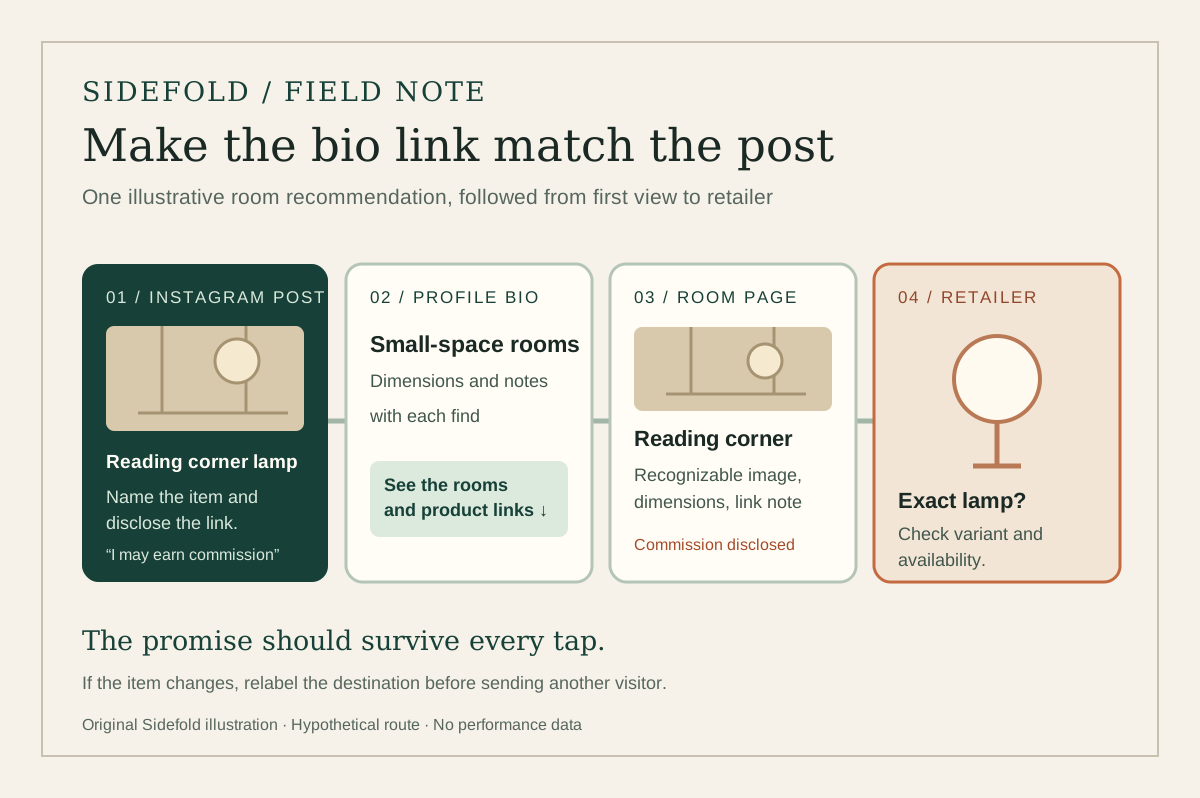
A follower sees the lamp in your room post, opens your Instagram profile, and finds a row of links called “Shop,” “Faves,” and “More.” Which one contains the lamp? Your bio has a few seconds to answer that question.
An Instagram bio for affiliate marketing works best as a signpost. Say what you help people find, name the destination, and make sure the first page after the tap matches the recommendation that sent them there. The example below is a writing exercise, not a claim that one bio format increases sales.
01
Write the reader promise before the link
Choose one kind of product question your posts regularly answer. “Small-space lighting with dimensions and honest notes” tells a visitor more than “Lifestyle | links below.” Keep the promise within your actual experience: if you have not used a product, do not describe it as tested.
Then make the invitation concrete. “Find the lamps from my room posts ↓” names the content and the action. A bio cannot carry every product detail, so let the linked page do that work. When your recommendations span several categories, promise an organized collection rather than suggesting that every link is for the latest post.
02
Choose a destination that matches the post
For one short campaign, the profile link can point to a specific page for the featured post. If you share many looks or rooms, a creator page can let readers identify the original post before opening its products. In either case, a visitor should recognize the image or description they just saw on Instagram.
Sidefold shoppable posts keep a photo, product markers, notes, and creator-supplied retailer URLs together. A public creator shop can collect live posts under one address. Sidefold preserves the destination URLs you add; it does not approve affiliate placements or pay commissions. Read your program’s current terms before placing its URLs on a social profile or a third-party page.
Our link-in-bio versus shoppable-post guide helps you choose between a general home and a post-specific page. The route diagram above shows the role of each step: the Instagram post names the item, the bio points to the right collection, and the product page answers the shopping question.
03
Build a short bio readers can act on
Use three parts: what you cover, what makes the recommendations useful, and where to find them. Here is a hypothetical version for a home creator:
Small-space rooms and lighting ideas
Dimensions and setup notes with each find
See the rooms and their product links ↓
The linked page should lead with recognizable room posts, such as “Reading corner: wall lamp and shelf,” not a generic “Shop now.” If an item is sold out, mark it unavailable or label a replacement as an alternative. Do not call a similar product the exact item from the photograph.
Keep the bio broad enough to survive the next post. Update the destination page or the top link when the current campaign changes, then reread the profile as someone seeing it for the first time. Our Instagram bio link page gives you a place to organize those destinations.
04
Put the commercial relationship beside the recommendation
A bio statement such as “some links may earn commission” can give general context, but it cannot do all the disclosure work. The FTC’s influencer guidance says a disclosure should appear with the endorsement and warns that profile-only notices are likely to be missed. Its affiliate marketing Q&A also explains why “affiliate link” alone may not tell readers that you earn from purchases.
For a US-facing recommendation, use clear language near the product mention, such as “I may earn a commission if you buy through this link.” When you mark your own affiliate links in a Sidefold shoppable post, the published page displays an affiliate disclosure explaining that the creator may earn a commission. That supports the destination page; you still need to disclose the relationship in the Instagram recommendation. Check your program’s requirements, Instagram’s current tools for the format you publish, and the rules for other countries you reach.
05
Test the path as a new visitor
Open the published Instagram post, visit the profile, tap the public link, and locate the promised item on a phone. Check the retailer page’s product, variant, country, and availability. Ask someone unfamiliar with your page which link they would tap for that post; a hesitation is useful evidence that a label needs work.
- Post: Can the reader tell what is recommended and whether you may earn from it?
- Bio and first page: Does the invitation match a visible, recognizable destination?
- Product link: Is the exact item or a clearly labelled alternative available in the reader’s market?
Repeat the check when a retailer changes a listing or you reorganize the page. Clicks can show that a route is used, but they do not establish a purchase or commission. Your affiliate provider’s settled reporting is the source for those outcomes. For the broader publishing workflow, see our Instagram affiliate marketing guide.
06
Common questions
Should I put an affiliate URL directly in my Instagram profile?
You can link to a destination your program permits, but a page with the relevant post, product context, and a clear disclosure may be easier for a visitor to understand. Check your program's current placement rules before choosing either route.
Is an affiliate disclosure in my bio enough?
No. For endorsements reaching US consumers, FTC guidance says a profile-only disclosure is likely to be missed. Disclose the relationship with the Instagram recommendation. When you mark your own affiliate links in a Sidefold shoppable post, that page also displays a commission disclosure. Check the rules for your audience's markets.
Can Sidefold pay my affiliate commissions?
No. Sidefold publishes your shoppable content and preserves the product URLs you provide. The affiliate provider handles attribution, qualifying purchases, and payment.
Follow one post all the way to the item.
Write the promise, choose the matching page, disclose the relationship, and check every tap from a phone.