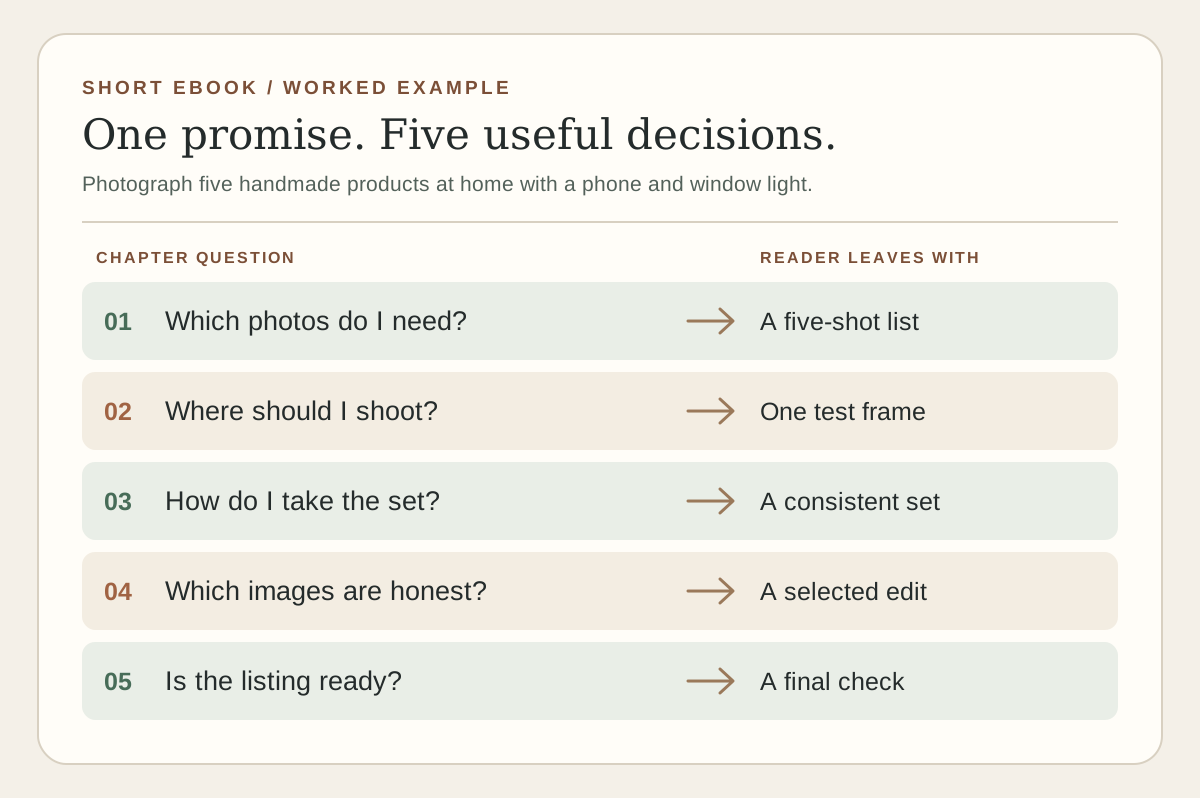
A blank document invites a long introduction. A reader needs something else: a clear promise, a route through the problem, and enough detail to take the next step. Plan that route before you count pages.
This guide is for a creator writing a short, practical ebook from scratch. The example below is hypothetical: a weekend guide to photographing handmade products at home. Replace its subject with your own expertise, and keep the reader’s task in view.
01
Name one reader and one finished task
Write down who will use the guide, what they already know, and what they should be able to do when they close it. “Photography tips” leaves too many choices. “A maker can photograph five products near a window using a phone and a simple background” gives you a test for every section.
Ask what could stop that person: no studio, inconsistent light, shiny objects, or uncertainty about which pictures a product listing needs. Pick the obstacles you can explain well. State what the guide will not cover, such as paid camera equipment or professional retouching.
Reader: a maker preparing a first online listing.
Result: a small set of clear product photos made at home.
Limit: phone, window light, and a weekend; no promise of sales.
02
Turn the task into a chapter route
List the decisions in the order the reader must make them. For the example: choose the shots, prepare a simple setup, take the photos, select and edit honestly, then check the listing. That sequence is the diagram above. It is an illustrative workflow, not measured reader behavior.
Give each chapter a question and an output. “Set up the scene” might answer “Where should I put the product?” and end with one test frame. If two chapters produce the same thing, combine them. If a chapter needs knowledge the reader has not yet learned, move it later or add a short bridge.
| Chapter question | Reader output | What to include |
|---|---|---|
| Which photos are needed? | A five-shot list | Whole item, scale, detail, use, and any flaw. |
| Where should I shoot? | One test frame | Window position, background, and clutter check. |
| Which images should I publish? | A selected set | Focus, color, crop, and honest representation. |
This plan is deliberately small. Your subject may need fewer or more chapters. A chapter earns its place when it changes what the reader can do.
03
Draft one chapter as a usable instruction
Start with the task, then give a short reason, the steps, a concrete example, and a check. In the setup chapter, tell the reader to place the product near a window, turn off mixed room lighting, take a test image, and compare the product’s color with what they see in person. Explain what to change if the image is too dark or the background competes with the item.
Write in the order someone will act. Put equipment alternatives beside the step that needs them. Define a term the first time it matters. Use a checklist only where it helps the reader verify a result; do not turn every paragraph into a bullet list.
04
Test the route before polishing the pages
Ask a person who resembles the intended reader to read the outline and one draft chapter. Give them the promised task, then ask where they paused, which instruction they could not follow, and what they still needed to know. Watch for missing steps instead of asking only whether they liked the writing.
Revise the chapter route from that feedback. Check any factual claim, product recommendation, photograph, quote, or permission that may change or belong to someone else. Remove claims you cannot support. A short ebook can be useful without pretending to be a complete course.
05
Structure the source, then inspect each edition
In Google Docs, apply heading styles to real chapter and section titles rather than enlarging plain text. Google’s Docs help explains that its table of contents links to those headings and can be refreshed after edits. Descriptive headings also make the manuscript easier to scan while you revise it.
Give images useful captions and alternative text, and make link text say where it goes. Keep any worksheet readable without relying on color alone. The W3C EPUB reading-system specification describes navigation and reflow behavior; an EPUB reader can present your text differently from a fixed PDF page. Check both on a phone and a larger screen, including the contents, images, links, and final page.
Sidefold’s ebook maker can turn a structured Google Doc into a web book, PDF, and EPUB for review. It handles edition preparation after the writing and editing; it cannot decide whether your examples answer the reader’s question. For broader distribution, pricing, and print decisions, use our self-publishing guide. If you already have a blog archive, the blog-to-book outline guide starts from existing material instead.
06
Common questions
How long should a short ebook be?
Long enough to help one reader complete the promised task, and no longer. Start with the decisions and examples the reader needs; cut repeated background and unrelated advice. Page count will change with the reading format.
Should I design the cover before writing?
A working title is enough to start. Test the outline and one chapter first, then design a cover that accurately describes the finished guide.
Can I write an ebook in Google Docs?
Yes. Use actual heading styles for chapters and sections, keep the source organized, and inspect any generated web, PDF, or EPUB edition before sharing it.
Write the promise and three chapter questions.
Draft the chapter that will expose the most missing steps. Test it with one intended reader before designing the cover.