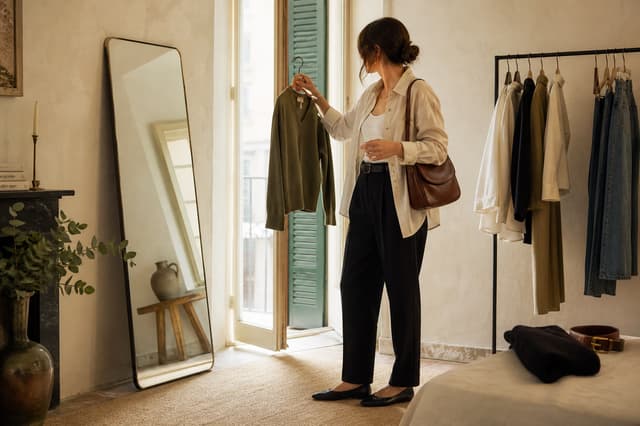
Shop the look is a content format that turns one styled image into a clear map of the products inside it. A follower sees the complete outfit first, then opens the exact jacket, shoes, bag, or alternative that caught their attention.
The useful part is not adding more links. It is preserving the relationship between the idea and the item. The photograph explains how the pieces work together; the product notes answer the practical questions; the links let the reader act without searching through a profile, caption, or generic storefront.
01
What “shop the look” actually means
A shop-the-look post begins with a complete visual idea: an outfit, a room, a travel kit, a beauty routine, or another collection of products used together. Each visible product is connected to a destination where the reader can learn more or buy it.
For fashion creators, that usually means one outfit photo with item-level links. The creator supplies the taste and context—why these trousers balance the overshirt, how the shoes change the proportion, which size is shown—while the retailer remains the place where the transaction happens.
A link-in-bio list can hold the same URLs, but it removes the visual logic. “Black trousers” is abstract in a list. The same trousers placed on the photograph carry silhouette, proportion, colour, and styling context. That context is the reason someone wanted to shop the look in the first place.
02
Start with a look, not a product catalogue
The strongest shoppable outfit is useful before anyone clicks. It answers a real styling question: what to wear to a summer dinner, how to layer for a wet commute, how to make one blazer feel less formal, or how to build a carry-on wardrobe around three colours.
Choose one intent and let it edit the frame. If the idea is “a relaxed work outfit,” every visible piece should support that promise. Unrelated products create more tagging work and make the page feel like inventory rather than a recommendation.
A full-length image is often the most legible anchor, but it does not need to look like an ecommerce shoot. A mirror photo, street photograph, detail-led carousel, or candid travel image can work when the styling is clear. Keep the first frame simple; use additional images for fabric, fit, or alternate angles.
03
Build the product list readers actually need
Work from the photograph and inventory every item you intend to recommend. Confirm the destination before writing the post. A beautiful marker that opens the wrong colour, a regional homepage, or an expired tracking URL breaks trust at the moment of highest intent.
- Name the piece.Use a human label such as “linen overshirt,” not the retailer’s entire product title.
- Confirm the URL.Open the exact destination in a signed-out browser and preserve your original affiliate parameters.
- Add fit context.Share the size worn, whether it runs small or large, and any alteration that changes the result.
- Mark alternatives.Say clearly when a link is a similar option rather than the exact item in the photograph.
- Test on mobile.Check that every marker, product card, disclosure, and retailer page is readable by thumb.
Choosing an affiliate platform for these links? Our ShopMy vs. LTK comparison for fashion creators covers eligibility, retailer fit, and how to compare earnings.
Exact items, similar options, and sold-out products
An exact item should be labelled as exact. An alternative should explain the relevant similarity—shape, material, colour, or price—instead of quietly substituting a different product. If the original is sold out, keep the styling lesson and update the link note rather than pretending the replacement is what appears in the photograph.
Relaxed linen overshirt · exact item
Wearing a small for an oversized fit. The fabric is light enough to layer; sleeves are rolled twice in the photograph.
Check links on a schedule that matches the life of the post. Seasonal fashion may need frequent review; a durable wardrobe guide can be checked less often. When a destination disappears, remove it, label the item unavailable, or add a genuinely comparable option.
04
Make the image and product details work together
A shop-the-look page has two simultaneous reading paths. Visual readers explore the outfit through product markers. Detail-oriented readers scan a product list for names, fit notes, prices, and destinations. Both paths should describe the same set of items in the same order.
Lead with the complete look
Let the photograph communicate the idea before product cards, prices, or calls to action compete for attention.
Place markers precisely
Put each marker on or beside its item. Avoid faces, important garment details, and clusters that are hard to tap.
Repeat products in a ledger
Provide a plain list below or beside the image so the page still works for keyboard users and readers who prefer text.
Keep the recommendation attached
Show the creator’s sizing, styling, or use note before sending the shopper to a retailer.
Do not hide the useful details behind hover alone. Hover does not exist on most phones, and product information should remain reachable by keyboard and assistive technology. A marker can be an invitation, but the product ledger should be the dependable record.
The photograph creates desire. The notes make the recommendation credible. The link is only the final step.
05
Disclose affiliate links where people will see them
If you may earn a commission or have another material relationship with a brand, make that relationship easy to notice and understand. Do not rely on a disclosure buried on an About page, at the end of a long caption, or inside a dense group of hashtags.
The U.S. Federal Trade Commission’s Disclosures 101 for Social Media Influencers says disclosures should be hard to miss, use simple language, and appear with the endorsement itself. Requirements differ by country and relationship, so check the rules that apply to you, your partners, and your audience.
- Use direct language. “This post contains affiliate links. I may earn a commission if you buy through them.”
- Disclose on the social post. A linked page does not replace a disclosure required in the post, story, or video itself.
- Disclose on the shopping page. Keep the relationship visible near the product recommendations.
- Identify gifts or sponsorships. A free product, discount, payment, employment, or other connection may require more specific wording.
- Describe your real experience. A link does not justify claims you cannot support or an opinion you do not hold.
Sidefold labels affiliate items, places an affiliate disclosure on the published post, and marks paid links for search engines. The creator still decides whether a link is affiliate and remains responsible for accurately describing every commercial relationship.
07
Measure the look, not just the post
Likes tell you whether a social post travelled. Product clicks reveal which part of the look created shopping intent. Keep those signals separate. A widely shared outfit can produce few clicks; a quieter post can send highly interested readers to one specific item.
Use click patterns to improve presentation, not to erase your taste. If the jacket earns most of the attention, make its marker clearer and answer more fit questions. If a subtle accessory repeatedly earns clicks, give it a detail frame next time. Compare retailer-reported conversions separately because a product click and a completed purchase are different events.
08
Shop-the-look questions
What does “shop the look” mean?
It means presenting a complete styled image with links to the individual products shown. Readers can understand the overall idea, then open the exact items or clearly labelled alternatives.
How do I create a shop-the-look post?
Choose one clear outfit image, list the featured products, confirm each destination, add sizing or styling notes, place product markers, add the appropriate commercial disclosure, test the page on mobile, and publish it from one stable link.
Can I use my existing affiliate links?
Yes. Sidefold preserves the retailer or affiliate-network URL you provide. Your affiliate provider continues to handle purchase attribution and commission payment.
What should I do when an item sells out?
Label it unavailable, remove the destination, or offer a genuinely similar item. Make it clear whether a new link points to the exact product or an alternative.
Do I need my own online store?
No. A shoppable post can send each product click to its original retailer. You need permission to use the content and valid product links, but Sidefold does not require you to hold inventory or process affiliate-product checkout.
The outfit is already styled. Give every piece its place.
Turn an Instagram post or original photo into a permanent shoppable page with precise product markers, your existing affiliate links, and one creator-shop address for your bio.