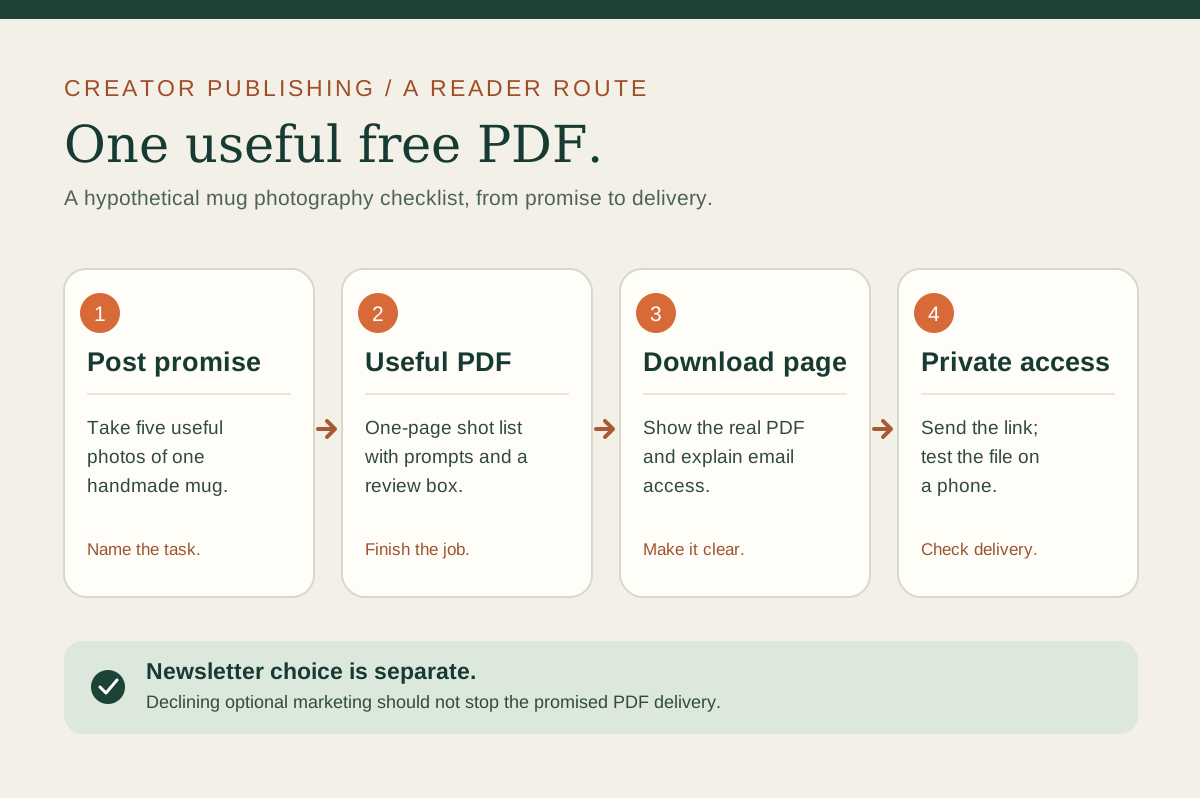
A free PDF earns its place when a reader can use it without buying anything else. Start with a task your audience already asks about, give them a small tool to complete it, and make the route from your post to the delivered file clear.
This example follows a ceramics creator offering a one-page shot list for photographing a handmade mug. It is an editorial example, not a customer result. The diagram shows the four parts to check: promise, file, download page, and private delivery.
01
Pick one task the reader can finish
“Free guide to product photography” could mean lighting, editing, styling, equipment, or listing copy. A narrower promise is easier to deliver: “Take five useful photos of one handmade mug.” The reader should know what they can do after opening the PDF.
Broad: Better product photos
Useful: A five-shot list for a handmade mug
Output: Five photos ready to review for a listing
Write the steps before designing the page. For the mug, they might be: front view, scale in a hand, handle detail, inside glaze, and a use scene. Include a small note beside each shot explaining what it helps a buyer see. If the method needs more teaching, link to a longer guide after the checklist rather than hiding a necessary step behind a purchase.
02
Make a PDF someone can use on a phone
Put the outcome and the five shots on the first page. Leave room to tick each shot and note what to fix. Use readable type, high contrast, descriptive link text, and only images that explain a step. A decorative cover should not push the checklist to page three.
Export the PDF, then open it on a phone and a laptop. Zoom to normal reading size, try every link, check the page order, and confirm the file name describes the resource. Have someone unfamiliar with the draft follow the list and tell you where they stopped. If they cannot identify the next shot, revise the instruction before publishing.
If your material needs maps, chapters, or many examples, a short ebook or a fuller digital guide may fit better. A checklist should stay short because the task is short, not because every lead magnet needs one page.
03
Tell readers exactly what arrives
The download page should name the audience, the task, the format, and the access step. For example: “Five photos to take before listing a handmade mug. One-page PDF with shot prompts and a review box. Enter your email to receive a private access link.” Show a real preview of the checklist so the promise is visible before the form.
In Sidefold, a digital guide or download can be set to zero price. A visitor enters an email address and receives private access immediately, with an email copy. Books and ebooks have a minimum sale price, so choose an eligible free publication type for this route. Check your current plan details and the public page before sharing it.
Connect the page from a post that teaches one of the shots. If the post promises a mug shot list, the first link should name that list and open its page. A broad bio page can still house your other work, but the route from this post should be easy to recognize. Our link order guide shows how to test that match.
04
Test delivery separately from newsletter signup
Use a fresh email address to request the resource on a phone. Check the confirmation, the private access page, the email copy, and the PDF itself. Repeat with the marketing choice left unchecked. The file should still arrive. On Sidefold, the free-resource form has a separate marketing consent choice; the delivery contact alone is not a request for ongoing newsletters.
Tell readers what any optional emails will cover and keep a record of their choice in the system you use for marketing. For current rules, the UK ICO explains separate consent for electronic marketing, and the US FTC explains commercial-email and opt-out requirements. Requirements vary by location, so check the rules relevant to your audience and sender before starting a sequence.
05
Improve the help, not just the signup count
After publishing, ask a few readers which shot was hardest to take and whether the checklist was enough to finish. Fix ambiguous prompts and broken links. Count requests if you need an operational check, but do not treat an email address as proof that the resource helped.
If readers repeatedly ask for lighting examples, that may be the next guide. Keep the free checklist complete for its original promise. A longer paid resource can teach a different, larger job. For an example of turning a specific method into a free resource, see our capsule wardrobe planning guide.
06
Common questions
Does a free PDF need to be a long ebook?
No. A one-page checklist can be more useful if it helps a reader finish a specific task. Choose the length that the instructions require.
Does someone who requests the PDF join my newsletter?
Requesting delivery and agreeing to ongoing marketing are separate choices. Sidefold's free-resource form offers a separate marketing consent choice; use a suitable email service and follow the rules that apply where you and your readers are located.
Can I make a Sidefold ebook free?
Sidefold books and ebooks have a minimum sale price. For a free lead magnet, publish an eligible digital guide or download at zero price instead.
Make one useful page.
Choose a task, write the steps, export the PDF, and test the full delivery route before you put the link in a post.